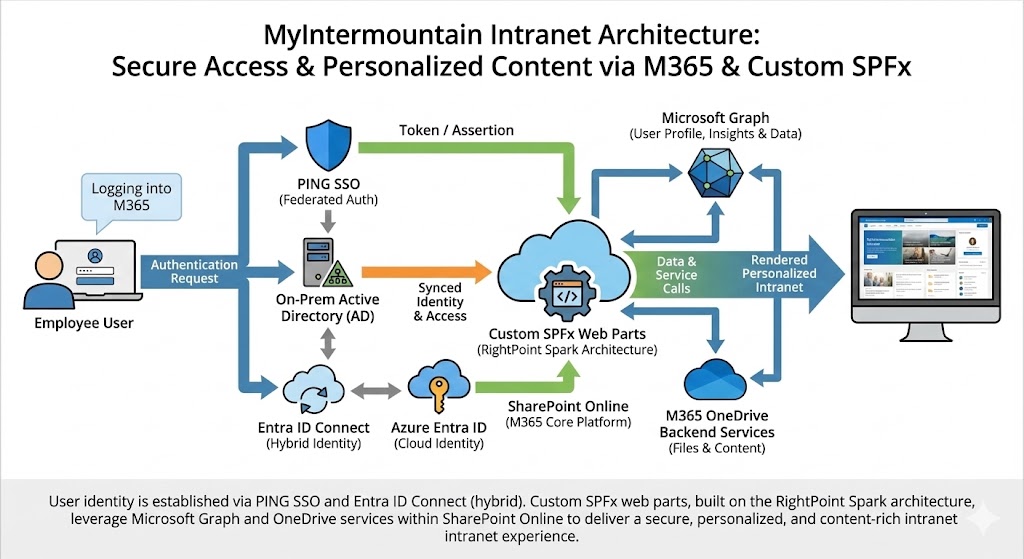
MyIntermountain Enterprise Intranet - Azure & SharePoint Infrastructure
Architected and delivered enterprise-scale SharePoint Online intranet infrastructure with Azure backend services, automated provisioning workflows, and enterprise SSO integration within 9 months as Scrum lead.
Client Testimonial
"This project demonstrates Fluxline's capability to architect enterprise-grade infrastructure, lead cross-functional teams through complex integrations, and deliver scalable solutions on compressed timelines. The MyIntermountain platform became a future-ready hub for organizational clarity and employee experience."
Terence Waters
CEO & Founder, Fluxline Resonance Group
Key Results
9 months
Project Duration
From architecture to production delivery
Scrum Lead
Team Leadership
Cross-functional agile delivery
100%
Automated Provisioning
Fully automated site creation workflows
Azure + PING
SSO Integration
Enterprise authentication unification
MyIntermountain Enterprise Intranet - Azure & SharePoint Infrastructure
INTELLECTUAL PROPERTY DISCLAIMER: This project is the proprietary intellectual property of Intermountain Health. This case study demonstrates Fluxline's capability to deliver enterprise-scale infrastructure and integrated Microsoft 365 solutions. All work was performed as a lead infrastructure developer and Scrum lead under employment with Intermountain Health. No proprietary code, screenshots, or confidential information is disclosed, and Fluxline was not involved in the actual development of this application.
Executive Summary
Intermountain Health required a scalable, secure enterprise intranet platform that unified Microsoft 365, Azure identity services, and SharePoint Online to create a future-ready employee experience hub. The challenge was to architect and deliver this complex infrastructure within 9 months while ensuring seamless integration across multiple enterprise systems.
Fluxline's approach combined Azure backend architecture, SharePoint Online frontend development, automated provisioning workflows, and enterprise SSO integration, all delivered through agile methodology as Scrum lead.
Key Results:
- ✅ 9-month delivery of complete enterprise infrastructure
- ✅ Automated provisioning with Power Automate and custom Spark tool
- ✅ Seamless Azure Entra ID and PING SSO integration
- ✅ Unified Microsoft 365 employee experience
- ✅ Scalable architecture supporting organizational growth
The Challenge
Business Context
Intermountain Health needed a modern intranet platform that could:
- Unify employee experience across Microsoft 365 services (SharePoint, OneDrive, Teams, Search)
- Automate provisioning for thousands of sites, reducing manual overhead
- Integrate enterprise SSO with existing PING infrastructure and Azure Entra ID
- Scale efficiently to support a large healthcare organization
- Deliver within 9 months with cross-functional team coordination
Technical Challenges
- Complex authentication layer: Bridging Azure Entra ID with legacy PING SSO
- Automated provisioning requirements: Diverse site creation needs with approval workflows
- Microsoft 365 integration: Unified experience across SharePoint, OneDrive, Teams, Search
- Compressed timeline: 9-month delivery window requiring aggressive sprint planning
- Cross-functional coordination: Development, QA, stakeholders, and executive leadership
What Was at Stake
Without a scalable intranet infrastructure, Intermountain Health faced:
- Fragmented employee experience across disconnected tools
- Manual provisioning bottlenecks slowing organizational agility
- Authentication friction reducing productivity
- Limited ability to scale with organizational growth
The Solution
Azure Backend Architecture
Infrastructure Services:
Architected comprehensive Azure backend supporting:
- Azure Functions: Serverless backend logic for authentication and provisioning
- Power Automate: Workflow automation for provisioning requests and approvals
- Azure Entra ID: Modern identity management and single sign-on
- Microsoft Graph API: Unified M365 service integration layer
- Automated permissions management: Role-based access control (RBAC)
Authentication & Identity Integration:
Designed seamless authentication layer:
- Azure Entra ID SSO for modern authentication
- PING SSO integration for legacy systems
- Unified login experience across all services
- OneDrive and SharePoint Online authentication
- Granular permissions management via Graph API
SharePoint Online & Microsoft 365 Frontend
Employee Portal Experience:
Built comprehensive employee portal with:
- SharePoint Online as primary intranet hub
- Microsoft 365 service integration (Teams, OneDrive, Planner)
- SPFx (SharePoint Framework) custom web parts
- Microsoft Search integration for unified content discovery
- Responsive design for desktop and mobile
Content Management:
Implemented scalable content architecture:
- OneDrive integration for personal file storage
- SharePoint Online document libraries and lists
- Automated content migration workflows
- Permissions management via Graph API
- Information architecture and navigation design
Automated Provisioning & Workflows
Spark Provisioning Tool:
Developed custom C# provisioning application:
- Automated site creation and configuration
- Template-based provisioning workflows
- Integration with Power Automate for approvals
- Bulk provisioning capabilities
- Configuration management and governance
Power Automate Workflows:
Built comprehensive automation:
- Provisioning request handling and routing
- Multi-level approval workflows
- User onboarding and offboarding automation
- Content approval and governance
- Integration with Azure backend services
Agile Leadership & Delivery
Scrum Lead Responsibilities:
Led agile delivery process:
- Daily standups, sprint planning, and retrospectives
- Cross-functional team coordination (dev, QA, stakeholders)
- Product backlog management and sprint velocity tracking
- Impediment removal and dependency coordination
- CI/CD pipeline setup and deployment strategy
Quality Assurance:
Established comprehensive QA processes:
- Testing standards and automated test suites
- UAT coordination with stakeholders
- Security and compliance validation
- Performance testing and optimization
- Production readiness reviews
CI/CD Pipeline:
Implemented automated delivery:
- Azure DevOps pipeline configuration
- Automated build and deployment processes
- Environment management (dev, test, staging, production)
- Version control and release management
- Rollback procedures and disaster recovery
The Process
Phase 1: Architecture & Planning (Months 1-2)
Discovery & Design:
- Stakeholder interviews and requirements gathering
- Azure architecture design and service selection
- SharePoint information architecture planning
- Authentication integration strategy
- Provisioning workflow design
Technical Foundation:
- Azure environment setup and configuration
- Development environment provisioning
- CI/CD pipeline foundation
- Security and compliance framework
- Agile sprint planning and team setup
Phase 2: Core Development (Months 3-6)
Backend Development:
- Azure Functions for business logic
- Azure Entra ID integration
- PING SSO bridge development
- Microsoft Graph API integration
- Permissions management framework
Frontend Development:
- SharePoint Online portal design
- SPFx web part development
- Microsoft Search configuration
- OneDrive integration
- Responsive design implementation
Provisioning Automation:
- Spark tool development (C#)
- Power Automate workflow creation
- Template library development
- Testing and refinement
Phase 3: Integration & Testing (Months 7-8)
System Integration:
- End-to-end authentication testing
- Provisioning workflow validation
- Microsoft 365 service integration
- Performance optimization
- Security and compliance validation
User Acceptance Testing:
- UAT coordination with stakeholders
- Feedback collection and iteration
- Documentation and training materials
- Production readiness assessment
Phase 4: Deployment & Stabilization (Month 9)
Production Deployment:
- Phased rollout strategy
- Production environment configuration
- Monitoring and alerting setup
- User training and support
Post-Launch Support:
- Performance monitoring
- Issue resolution and bug fixes
- Optimization and refinement
- Knowledge transfer and documentation
The Results
Quantitative Outcomes
- 9-month delivery: Complete infrastructure from architecture to production
- 100% automated provisioning: Eliminated manual site creation overhead
- Unified SSO: Azure Entra ID + PING integration across all services
- Scalable architecture: Platform supporting organizational growth
- Cross-functional delivery: Successful coordination of dev, QA, and stakeholders
Qualitative Outcomes
- Enhanced employee experience: Unified Microsoft 365 integration reducing tool fragmentation
- Operational efficiency: Automated provisioning accelerating organizational agility
- Future-ready platform: Positioned for continued innovation and expansion
- Technical excellence: Scalable, secure architecture with modern best practices
- Leadership impact: Successful Scrum lead delivery of complex enterprise project
Technical Achievements
- Azure infrastructure: Comprehensive backend with Functions, Power Automate, Entra ID
- SharePoint Online: Modern portal with SPFx and Microsoft Search integration
- Automation: Custom Spark tool and Power Automate workflows
- CI/CD pipeline: Automated testing and deployment processes
- Enterprise integration: Seamless Microsoft 365 and legacy system integration
Key Learnings & Insights
1. Azure Infrastructure at Scale
Deep expertise gained in:
- Azure Functions for serverless backend architecture
- Power Automate for enterprise workflow automation
- Azure Entra ID for modern identity management
- Microsoft Graph API for M365 service orchestration
2. SharePoint Online Best Practices
Modern SharePoint development:
- SPFx framework for custom web parts
- Information architecture for enterprise intranets
- Microsoft Search integration for content discovery
- Responsive design for cross-device experience
3. Provisioning Automation
Building scalable provisioning:
- C# application development for Spark tool
- Power Automate workflow design for approvals
- Template-based configuration management
- Governance and compliance automation
4. Agile Leadership
Scrum lead responsibilities:
- Cross-functional team coordination
- Sprint planning and velocity management
- Stakeholder communication and expectation management
- CI/CD pipeline implementation
5. Enterprise Integration
Complex system integration:
- Bridging modern and legacy authentication systems
- Unified employee experience across diverse services
- Scalable architecture supporting organizational growth
- Security and compliance in healthcare environment
Technologies & Tools
Azure Services:
- Azure Functions
- Power Automate
- Azure Entra ID (Azure AD)
- Azure DevOps
Microsoft 365:
- SharePoint Online
- Microsoft Graph API
- SPFx (SharePoint Framework)
- Microsoft Search
- OneDrive
Development:
- C# (.NET)
- PING SSO
- RESTful APIs
- Responsive Web Design
Agile & CI/CD:
- Scrum methodology
- Azure DevOps Pipelines
- Automated testing
- Environment management
Capability Statement
This case study demonstrates Fluxline's capability to deliver:
✅ Enterprise Azure infrastructure with backend services, automation, and identity management
✅ SharePoint Online architecture with modern SPFx development and M365 integration
✅ Automated provisioning workflows using Power Automate and custom C# applications
✅ Enterprise SSO integration bridging Azure Entra ID with legacy systems
✅ Agile leadership as Scrum lead coordinating cross-functional enterprise delivery
✅ CI/CD pipeline implementation for automated testing, deployment, and release management
✅ Microsoft 365 integration using Graph API for unified employee experiences
Why This Project Matters
The MyIntermountain enterprise intranet represents a threshold of transformation in enterprise infrastructure design. It demonstrates Fluxline's ability to:
- Architect complex Azure solutions integrating multiple services and APIs
- Lead cross-functional teams through agile delivery on compressed timelines
- Automate enterprise workflows reducing operational overhead and accelerating agility
- Integrate modern and legacy systems creating seamless employee experiences
- Deliver scalable platforms positioned for organizational growth and innovation
This project embodies Fluxline's constellation of capabilities: technical mastery, agile leadership, and enterprise-scale delivery.
Related Resources
- MyIntermountain SharePoint Intranet Portfolio — additional technical details and implementation showcase
- Agile Transformation & Infrastructure Case Study — how we transformed the development team from siloed chaos to predictable delivery
- Digital Transformation Strategies Blog — framework and best practices for enterprise transformation
This case study demonstrates professional experience and technical capabilities. No proprietary intellectual property, screenshots, or confidential information belonging to Intermountain Health is disclosed.
Industry: Healthcare IT
Project Type: Enterprise Infrastructure & Intranet
Services: Development • Consulting • Agile Leadership
Related Capabilities: Azure • SharePoint Online • Power Automate • Microsoft 365 • Enterprise Integration